
XQ777 Game APK Download 2026 – Features & Guide
| Developer | XQ777 |
| Updated | Today |
| Size | 5MB |
| Version | v2.1.5 |
| Requirements | Android 5+ |
| Downloads | 399+ |
| Get it on |  |
Description
XQ777 Game is an online gaming platform that Android users may explore for mobile entertainment and account-based features. It brings different sections together in one place, allowing users to check the available options through a mobile-friendly interface. Before accessing the platform, users should learn how it works and check whether it supports their device.
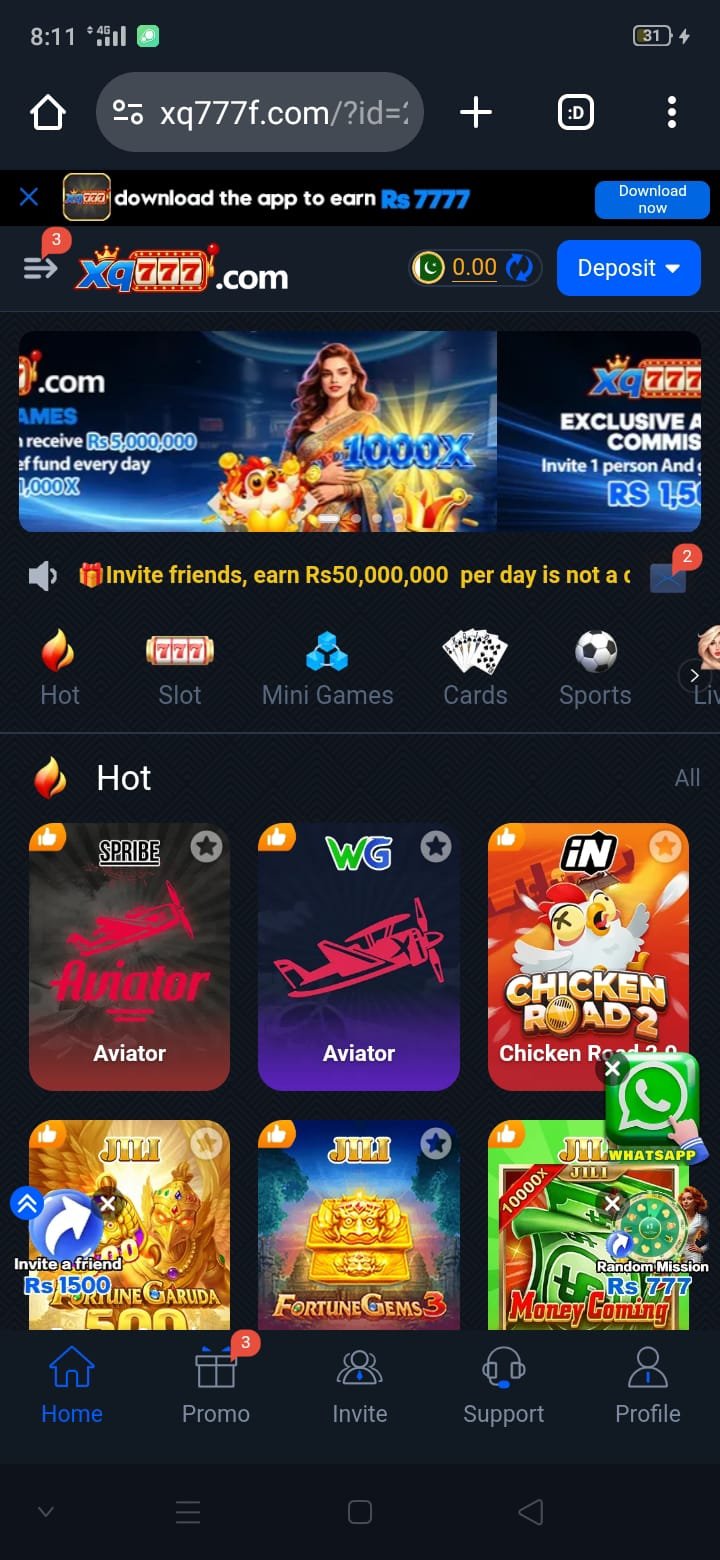
The platform may include account registration, login, game categories, and wallet-related sections, depending on the version available. However, features and payment options can change over time. Therefore, users should check the latest rules, account requirements, and transaction details before using any feature involving real money.
What Makes XQ777 Game Different?
XQ777 Game is designed for users who prefer exploring online gaming platforms through a mobile device. Its main sections may include account access, game menus, and other available services. A simple layout can help users understand the platform without spending too much time searching for basic options.
Another point users may notice is the mobile-focused design. Android users can access compatible websites or applications directly from their phones. However, the actual experience depends on the version, device performance, and internet connection.
Users who want to explore other gaming guides can also read our 7A GAME and BOO99 GAME for additional information about a different platform.
Key Features of XQ777 Game
XQ777 Game may provide different features depending on the version and service provider. The following points describe common features associated with online gaming platforms. Users should confirm the current details before relying on them.
- Mobile-friendly interface for Android users
- Registration and login options
- Different gaming and entertainment sections
- Account settings and profile management
- Wallet or transaction sections, where available
- Navigation between different platform menus
- Promotional information, depending on current terms
- Access through a compatible mobile browser or application
These features may not appear in every version of XQ777 Game. Therefore, users should review the available information before downloading an APK or creating an account.
XQ777 Game Interface and User Experience
The interface plays an important role in helping users understand an online platform. A clear menu, readable text, and organized sections can make it easier to locate account settings and other available options.
XQ777 Game may offer a mobile-oriented layout for people who prefer using a smartphone. However, loading speed and navigation can vary between devices. For a smoother experience, keep your Android software updated and use a stable internet connection.
If you access the platform through a browser, check the website address before entering your login details. Similarly, if you use an APK, confirm its source and review its requested permissions.
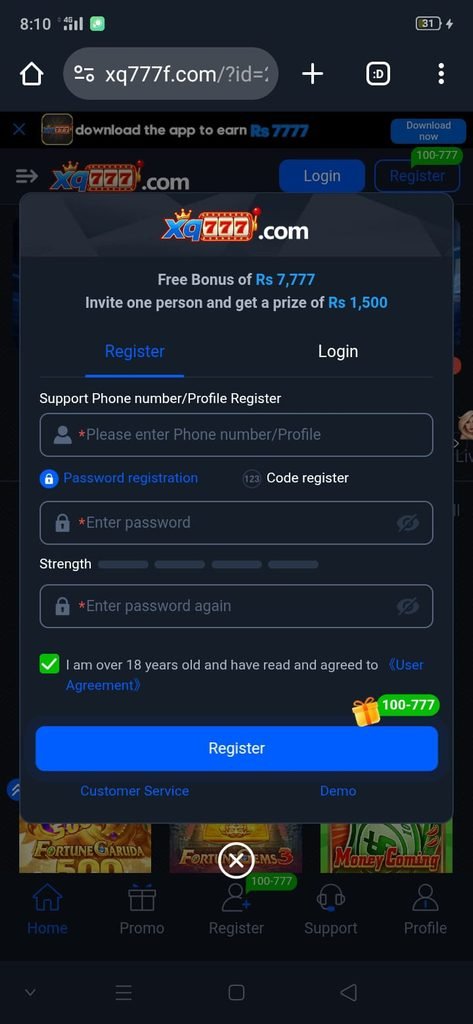
XQ777 Game Registration
Users who want to access account-based features may need to register first. The exact process depends on the platform’s current requirements, so always follow the instructions shown by the verified provider.
How to Register on XQ777 Game
Follow these general steps if the platform offers account registration:
- Open the verified XQ777 Game website or compatible application.
- Find the Register or Sign Up option.
- Enter the information requested by the platform.
- Create a strong password that you do not use elsewhere.
- Complete any required verification.
- Read the account terms and privacy information.
- Submit the registration form if you understand the conditions.
- Keep your login details in a safe place.
Do not provide unnecessary personal information to an unknown website. Also, never share your password or verification code with another person.
XQ777 Game Login Guide
After creating an account, users may access it through the login section. Before signing in, make sure you have opened the correct website or application.
Steps to Login
- Open the verified XQ777 Game platform.
- Select Login or Sign In.
- Enter your registered username, phone number, or email address, as required.
- Type your password carefully.
- Complete any verification step if requested.
- Select the login button to continue.
If you cannot access your account, check your internet connection and login details first. If you forget your password, use the official recovery option instead of sharing your account information with someone offering help.
XQ777 Game Download and Installation
Android users may prefer installing an application because it can provide direct access from the phone’s home screen. However, the availability of an official XQ777 Game APK should be confirmed before downloading a file.
How to Download XQ777 Game
- Open your browser on your Android device.
- Look for the verified website of the app provider.
- Find the download section, if one exists.
- Check the application name and version information.
- Review the minimum Android requirements.
- Read the available privacy details and permissions.
- Download the APK only if you trust the source.
- Check the downloaded file before opening it.
Download Points
- Use a verified download source whenever possible.
- Check the file name and version before installation.
- Avoid modified APK files from unknown websites.
- Do not trust misleading download buttons or pop-up messages.
- Keep your device’s security features enabled.
- Delete unnecessary installation files after checking them.
How to Install XQ777 Game
If you have confirmed the file’s source, follow these general Android installation steps:
- Open your phone’s Downloads folder.
- Find the downloaded APK file.
- Tap the file to begin installation.
- Review any permission request from Android.
- Allow installation from that source only if you trust it.
- Return to the APK file and continue.
- Wait for the installation process to finish.
- Open the application if installation completes successfully.
Android settings may differ between phone models. If the file does not install, check your available storage, Android version, and APK compatibility. Avoid disabling important security protections to install a file from an unknown source.
How to Deposit on XQ777 Game
Some online gaming platforms provide wallet sections for payment-related activities. However, this guide does not confirm the current deposit methods or transaction services offered by XQ777 Game.
Before using any payment feature, check the provider’s official instructions, transaction rules, and applicable fees. Never send money to an individual or account that you cannot verify.
Deposit Points
If a verified version of the platform offers deposits, these general checks may help:
- Sign in to the correct account.
- Open the wallet or deposit section.
- Review the available payment methods.
- Read the transaction conditions carefully.
- Check the amount and recipient details.
- Confirm the transaction only if you understand the terms.
- Save the transaction reference for your records.
Do not assume that a displayed payment option guarantees successful processing. If a transaction fails, contact the verified provider through its official support channel.
How to Withdraw Money from XQ777 Game
Withdrawal features depend on the services provided by the platform. If XQ777 Game offers a withdrawal section, users should read its requirements before submitting a request.
Some services may require account verification or additional information. However, users should never share their passwords or verification codes with another person to process a withdrawal.
Withdrawal Points
If the platform supports withdrawals, follow its official instructions and review these general steps:
- Open the verified platform and sign in.
- Find the wallet or withdrawal section.
- Review the available methods and requirements.
- Check the account details you need to provide.
- Review the requested amount and any applicable conditions.
- Submit the request only after checking all details.
- Save the transaction reference.
- Check the transaction status through the official account.
If a withdrawal takes longer than expected, review the published processing rules and contact verified support. Avoid paying unexpected fees or sending additional money to unknown individuals who promise to release funds.
Games and Entertainment Options
The types of games available on XQ777 Game may vary according to the platform version. Users should check the current game menu and official description to learn which categories the service actually provides.
Online platforms can include different forms of digital entertainment, such as casual games, number-based activities, card-style games, or other interactive options. However, this list describes general categories and does not confirm that XQ777 Game contains each one.
Before opening any game, read its rules and understand whether it involves purchases, deposits, or real-money activity. Games involving chance and money can carry financial risks, and users should not treat them as a reliable source of income.
XQ777 Game Bonuses and Promotional Offers
Some gaming platforms display promotional campaigns or special offers from time to time. Availability and conditions can change, so users should check the latest information from the verified provider.
Before accepting an offer, read the complete terms. Look for eligibility rules, expiry dates, minimum requirements, withdrawal limits, and other conditions that may apply.
Do not assume that an advertised bonus provides cash that you can withdraw immediately. If the offer has unclear rules or asks for unexpected payments, take time to review it before proceeding.
Account Security and Responsible Usage
Account security matters whenever you use an online platform. Create a strong password and avoid using the same password across multiple websites. In addition, never share your login details or verification codes with anyone.
You should also check the website address before signing in. If you use an Android APK, review its source and permissions before installation. An unfamiliar app that requests access to unrelated personal information may create privacy risks.
Responsible usage is important when a platform includes real-money features. There is no guaranteed method of winning, and financial losses can occur. Set personal limits, understand the rules, and avoid spending money that you need for essential expenses.
Tips for New Users
New users should learn how the platform works before trying its different features. Start by reviewing the main menus, account settings, privacy information, and available support options.
Keep a record of important account activity when necessary. For payment-related services, save transaction references and review account statements. If anything appears incorrect, contact the verified provider rather than relying on unknown social media accounts.
Also, keep your phone and browser updated. Use a stable internet connection and avoid installing additional applications suggested by unfamiliar websites. These basic steps can help reduce common security and technical problems.
Advantages of XQ777 Game
The following points describe possible advantages of a mobile gaming platform. They do not confirm that every feature is available in XQ777 Game.
Pros
- A mobile-friendly layout may make navigation easier.
- Account menus can help users find personal settings.
- A compatible Android application may offer direct access.
- Clear installation instructions can help beginners.
- A well-organized interface may reduce confusion.
- Published rules can help users understand available features.
The usefulness of these points depends on the actual application and its provider. Users should confirm the available features before deciding whether to install or use the platform.
Disadvantages of XQ777 Game
Cons
- The official developer and APK source may be difficult to confirm.
- Features can vary between versions.
- Some third-party downloads may contain harmful files.
- Older Android devices may have compatibility problems.
- Payment services may involve additional terms or restrictions.
- Unclear support information can make account issues harder to resolve.
Therefore, users should check the source and understand the risks before installing the app. If the provider does not offer clear information, avoid sharing personal details or making financial transactions.
XQ777 Game System Requirements
The exact system requirements depend on the version of the application. Unless the developer publishes confirmed specifications, the following details serve as general guidance for Android users.
Android Version
Check the minimum Android version listed by the verified provider. Some applications support older devices, while others need a newer operating system.
RAM
Available RAM affects how smoothly an application runs. A phone with limited memory may slow down when several apps run at the same time. The actual RAM requirement for XQ777 Game has not been confirmed here.
Storage
Keep enough free space for the APK file, installation, and application data. Storage needs may change with updates or additional content.
Internet Connection
Some online gaming platforms need an internet connection to load content, access accounts, and update information. A stable connection may reduce loading problems, but actual performance also depends on the device and service.
Is XQ777 Game Safe?
The safety of XQ777 Game depends on the actual application, its developer, the download source, and the permissions it requests. The name alone does not confirm that a particular APK is genuine or secure.
Before downloading, look for the provider’s official website, contact details, privacy policy, and current version information. If possible, scan the APK with a reputable mobile security tool before installing it. Remember that a security scan cannot guarantee complete protection.
Be careful with websites that use misleading download buttons, unexpected redirects, or claims that sound too good to be true. Avoid installing files that require you to disable important security features or add unrelated applications.
If the platform includes payment-related services, read the applicable terms and local rules before using them. Do not share banking details, passwords, or verification codes with unknown people. If you cannot verify the source, do not install the file.
Frequently Asked Questions
1. What is XQ777 Game?
XQ777 Game is a name associated with an online gaming platform that users may search for when looking for mobile entertainment options. Its exact features and services depend on the version and provider. Check official information before creating an account or downloading an APK.
2. How can I download XQ777 Game?
First, look for a verified website belonging to the app provider. Check the version, Android requirements, and requested permissions before downloading. Avoid unfamiliar websites that do not identify the developer or explain the file’s origin.
3. How do I install XQ777 Game on Android?
After checking the APK source, open the file from your Downloads folder and follow Android’s installation instructions. If your phone asks for permission to install apps from that source, allow it only if you trust the file. If installation fails, check compatibility and available storage.
4. Does XQ777 Game require registration?
Registration requirements depend on the actual platform. If the app provides an account system, follow the instructions from its verified provider. Read the privacy information before submitting personal details, and keep your password private.
5. Can I use XQ777 Game on every Android phone?
No. Compatibility depends on the minimum Android version, available RAM, storage, and other technical requirements. Check the developer’s specifications before installing the application.
6. What should I do if XQ777 Game does not open?
First, check your internet connection and restart the application. Then, confirm that your phone meets the app’s requirements and has enough free storage. If the problem continues, consult the verified provider’s support information.
7. How can I protect my XQ777 Game account?
Use a strong, unique password and never share verification codes. Check the website address before signing in, and avoid links from unknown messages. If you notice unusual account activity, use the provider’s official security or support options.
8. Is XQ777 Game available on the Google Play Store?
This guide does not confirm whether the specific application currently appears on Google Play. Search the Play Store using the exact name and review the developer details. Do not assume that an app with a similar name belongs to the same provider.
9. Does XQ777 Game offer deposits and withdrawals?
Payment-related features depend on the actual version and provider. This guide does not confirm specific payment methods or processing times. If the platform offers these services, review its official terms, fees, and restrictions before using them.
10. Can I update XQ777 Game?
Updates depend on how the provider distributes the application. Check the verified source for new versions and follow its instructions. Avoid update files from unknown websites or messages, as they may contain harmful software.
Final Thoughts on XQ777 Game
XQ777 Game is a term that Android users may search for when looking for information about an online gaming platform, its features, and its installation process. Before using the service, check the developer’s identity, the available version, device compatibility, account requirements, and privacy information.
Overall, take care when installing any APK outside the Google Play Store. Review the requested permissions, protect your account details, and understand the platform’s rules before using any feature involving real money. If you cannot verify the source of XQ777 Game, avoid installing the file until you can confirm its origin.
Download links
How to install XQ777 Game APK Download 2026 – Features & Guide APK?
1. Tap the downloaded XQ777 Game APK Download 2026 – Features & Guide APK file.
2. Touch install.
3. Follow the steps on the screen.