
RR3 Game APK Download 2026 – Features & Guide
| Developer | RR3 |
| Updated | Just Now |
| Size | 7.5MB |
| Version | v1.4.6 |
| Requirements | Android5+ |
| Downloads | 999+ |
| Get it on |  |
Description
Mobile gaming is becoming more popular in Pakistan. Many people enjoy using apps that offer different games in one place. RR3 Game is one such application that users may come across while searching for Android gaming platforms.
RR3 is described as a mobile gaming app with different game categories and account features. Users can explore its interface, create an account, and access the available games through their Android devices.
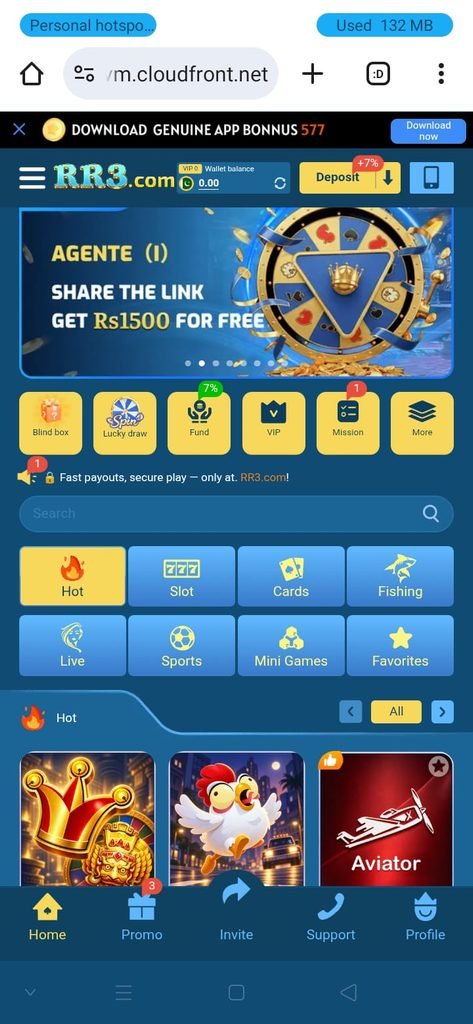
The app is promoted as a lightweight option. However, its actual size, performance, and compatibility may depend on the version you download and your mobile phone.
In this guide, we will explain RR3 Game in simple words. You will learn about its features, installation process, registration steps, payment options, and important safety points.
Please remember that some games may involve real-money deposits or chance-based outcomes. You should never treat gaming as a guaranteed source of income. Aslo Try PAKTOP and EP555
Overview of RR3 Game App
RR3 Game is an Android gaming application that brings different games together under one platform. Instead of installing several separate apps, users may find multiple game categories inside the same application.
The platform is promoted mainly for mobile users in Pakistan. Its interface is designed to provide access to different sections through a single app.
RR3 may include registration, login, game access, rewards, and account-related options. However, the available features can change depending on the app version and account status.
Before installing RR3, users should check the source of the APK file. The app does not appear to be available through the standard Google Play Store listing described by the original publisher, so users should take extra care when downloading it.
The availability of real-money features, bonuses, and withdrawals should also be checked directly through the app’s official terms.
Popular Games in RR3
RR3 is described as a platform with several game categories. The original app information mentions the following titles:
- Aviator
- Mines
- Chicken Road
- Tada Slots
- Evo Live
- 9Wickets Sports
- Jili Cards
- PG Slots
- WG Cards
- 7 Up 7 Down
- Sic Bo
The actual game list may change over time. Some games may also be unavailable in certain regions or versions.
Many of these games use chance-based results. Therefore, users should understand the rules before playing and avoid spending money they cannot afford to lose.
Key Features of RR3 Game App
RR3 is promoted with several features for Android users. Here are some of the main points to check before using the application.
1. Lightweight Android Application
RR3 is described as a small APK file. A smaller file may take less time to download and use less storage space.
However, the actual file size can vary between versions. Always check the download size before installing the app.
2. Multiple Games in One Place
One of the main features of RR3 is its collection of games.
Users may find different categories inside the application, including card games, slots, and other online games.
This setup can make it easier to explore available games without installing multiple applications.
3. Simple User Interface
RR3 is promoted as an easy-to-use gaming app.
A simple interface can help users find account settings, game sections, and other options without spending too much time searching through menus.
The actual experience may depend on the version and device.
4. Registration and Login Options
Users may be able to create an account using a phone number and password.
After registration, they can use their login details to access the account again.
Always use a strong password and avoid sharing your account information with anyone.
5. Rewards and Bonus Offers
Some versions or promotional pages may mention welcome bonuses, daily rewards, or referral offers.
These offers may come with specific rules. For example, a bonus might require users to complete certain conditions before they can withdraw funds.
Read the complete terms before accepting any offer. Do not assume that a bonus is equal to withdrawable cash.
6. Referral Program
RR3 may advertise a referral system that allows users to invite other people.
Before participating, check how referral rewards work and whether any conditions apply.
Avoid sending misleading earning claims or encouraging others to deposit money.
7. Language Options
The original app information mentions English and Urdu language options.
If these settings are available in your version, you may be able to select the language that is easier for you to understand.
8. Account and Payment Options
Some versions may include account balance and payment-related sections.
These options can vary by region and app version. Check the available payment methods, fees, and withdrawal conditions before using them.
How to Download and Install RR3 APK Safely on Android
RR3 is described as an APK-based Android application. APK files are commonly used to install Android apps outside the Google Play Store.
However, downloading an APK from an unknown website can expose your device to security risks.
Follow these steps carefully.
Steps to Download RR3 APK
- Open a web browser on your Android phone.
- Search for the RR3 Game APK.
- Check whether the website belongs to a trusted and verified publisher.
- Review the app version, file size, and permissions.
- Download the APK only if you trust its source.
- Wait until the download finishes.
Do not download files from websites that display suspicious advertisements or redirect you to unrelated pages.
Steps to Install RR3 Game
- Open your phone’s Settings.
- Find the option for installing unknown apps.
- Select the browser or file manager you used for downloading.
- Allow installation from that source only if you have verified the APK.
- Open your Downloads folder.
- Tap the RR3 APK file.
- Follow the installation instructions.
- Disable the unknown-app installation permission after completing the process.
Android menu names may differ depending on your phone brand and operating system.
If your phone displays a security warning, do not ignore it automatically. Stop the installation if you cannot verify the file.
How to Create an Account in RR3 Game
If registration is available, users may need a phone number or other account details.
Here is a general registration process:
- Open the RR3 application.
- Find the Register or Sign Up option.
- Enter your active phone number if requested.
- Create a strong password.
- Enter the verification code if the app asks for one.
- Review the account terms and privacy information.
- Complete registration.
Make sure your phone number is entered correctly.
For Pakistani mobile numbers, follow the format shown on the registration screen. If the app uses country code +92, it may require the number without the first zero.
For example, a local number beginning with 03 may need to be entered as 3XXXXXXXXX after selecting Pakistan’s country code.
Follow the exact format shown by the application.
Never share your OTP or password with another person.
How to Login to RR3 Game
After creating an account, you may be able to log in using your registered details.
Follow these steps:
- Open RR3 Game.
- Select the Login option.
- Enter your registered phone number.
- Type your password.
- Complete any verification step.
- Press the login button.
If you cannot access your account, check your phone number and password first.
Use the official account recovery option if available. Avoid sharing your login details with people who claim they can recover your account.
RR3 Game Deposit
RR3 Game displays different payment options for users who want to add funds to their accounts. The screenshot shows EasyPaisa QR and JazzCash QR payment options. These services are commonly used by people in Pakistan for mobile payments.
How to Deposit Money in RR3 Game
If the deposit feature is available in your account, follow these general steps:
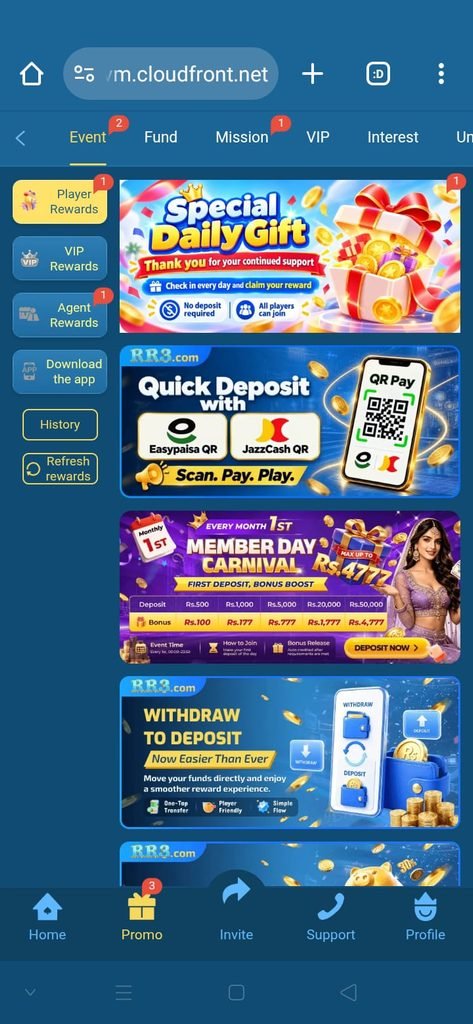
- Open RR3 Game and log in to your account.
- Go to the Fund or Deposit section.
- Check the available payment methods.
- Select EasyPaisa QR or JazzCash QR if supported.
- Enter the amount shown in the payment section.
- Follow the payment instructions carefully.
- Check your transaction status after completing the payment.
Always verify the recipient details before sending money. Do not transfer funds to an unknown personal account.
RR3 Member Day Bonus
The screenshot also displays a Member Day Carnival promotion with different deposit amounts and bonus figures. These offers may have specific conditions, including minimum deposits, eligibility rules, and bonus requirements.
Before joining any promotion, read the complete terms. A displayed bonus does not necessarily mean you can withdraw the full amount immediately.
How to Withdraw Money from RR3 Game
The original RR3 information mentions withdrawals through local payment services. However, withdrawal availability, minimum amounts, and processing times should not be treated as guaranteed.
Some promotional information mentions a minimum withdrawal of PKR 300. This amount may change, and users should confirm the current rules inside the application before making any financial decision.
General Withdrawal Steps
If the withdrawal feature is available in your account:
- Open RR3 Game.
- Log in to your account.
- Find the Wallet or Withdrawal section.
- Review the minimum withdrawal amount.
- Check the available payment methods.
- Enter your payment details carefully.
- Enter the amount you want to request.
- Review any fees or conditions.
- Confirm the request if you agree with the terms.
- Save the transaction details for your records.
Payment Methods in Pakistan
The original app information mentions these payment services:
- Easypaisa
- JazzCash
- Local bank accounts
These methods may not always be available. Check the actual payment options shown in your account.
Before depositing or withdrawing money, confirm the account holder details, processing time, and applicable fees.
Do not pay an additional fee to an unknown person who promises to release your withdrawal. Also, avoid sharing your PIN, OTP, or account password.
A withdrawal request does not guarantee payment. Always check the platform’s terms and understand the risks before depositing money.
Our Experience: Is RR3 Game Safe to Download?
RR3 is promoted as a lightweight Android gaming application with multiple game options. However, an app’s small size or simple design does not automatically make it safe.
The original article reports a small APK size and a VirusTotal result of 0/92. These are claims from that article, not an independent security verification for every RR3 version.
VirusTotal results can change when developers update an app. A clean scan also does not guarantee that an application is completely safe.
Before installing RR3, consider these points:
- Download the APK only from a verified source.
- Check the app’s requested permissions.
- Avoid installing modified or unofficial versions.
- Keep Android and Google Play Protect updated.
- Never share your password or OTP.
- Do not provide unnecessary personal information.
- Read the privacy policy and payment terms.
- Avoid depositing money you cannot afford to lose.
Is RR3 Available on Google Play Store?
The original article reports that RR3 was not available on Google Play Store at the time of its review.
Store availability may change. Check Google Play directly before downloading an APK from another source.
Can RR3 Be Used on iPhone?
The original information describes RR3 as an Android application.
An Android APK cannot be installed directly on an iPhone. iOS users should check whether the publisher provides a legitimate iOS version or website.
Do not install unknown profiles or certificates to access an unverified app.
Pros and Cons of RR3 Game
Before installing any gaming application, it is useful to understand its possible advantages and limitations.
Pros
- Multiple game categories in one app.
- Android-focused interface.
- Registration may be simple.
- May use less storage than several separate games.
- Includes account and game sections in one place.
Cons
- APK source may be difficult to verify.
- Not necessarily available through Google Play Store.
- Some games may involve financial risk.
- Bonus and withdrawal conditions may be unclear.
- Android compatibility can vary.
- Payment features may not work for every user.
These points are general considerations. Your experience may differ depending on the app version and your device.
Final Thoughts
RR3 Game is presented as an Android gaming platform with several game categories under one application. Its main attraction is the ability to explore different games without installing multiple separate apps.
The application may appeal to users who prefer a simple mobile interface. However, downloading an APK from outside Google Play Store requires extra care.
Before creating an account, review the app’s privacy policy, permissions, and terms. If the platform offers real-money games, remember that outcomes can depend on chance and losses are possible.
Do not consider RR3 a reliable way to earn money. Use caution, protect your personal information, and avoid spending money you cannot afford to lose.
Frequently Asked Questions
Q1. Can I use RR3 Game on a PC?
RR3 is described as an Android application. Some Android apps may work through compatible Android environments on a computer, but RR3 PC compatibility has not been independently verified.
Q2. Is RR3 Game available for iOS devices?
The information available in the original article describes an Android version. An official iOS version has not been confirmed.
Q3. What is the minimum withdrawal amount in RR3?
The original article mentions PKR 300. However, the minimum amount may change, so check the current withdrawal terms inside the app.
Q4. Which payment methods does RR3 support?
The original information mentions Easypaisa, JazzCash, and local bank accounts. Actual payment availability may vary.
Q5. Is RR3 Game free to download?
The app is promoted as free to download. However, some games may include deposits, purchases, or other financial features.
Always check the terms before spending money.
Q6. Does RR3 work on Android 5?
The original article mentions Android 5 or later. However, this requirement has not been independently verified for the latest version. Check the app’s current compatibility information before installing it.
Q7. Is RR3 Game safe?
Safety depends on the APK source, app permissions, and how the application handles user data. A security scan alone cannot guarantee that an app is safe.
Download carefully and avoid sharing sensitive information.
Thank You for Visiting!
Thank you for reading this RR3 Game guide. We hope it helped you understand the app, its features, installation process, and important safety points.
Always research an application before downloading it or sharing your personal information.
Download links
How to install RR3 Game APK Download 2026 – Features & Guide APK?
1. Tap the downloaded RR3 Game APK Download 2026 – Features & Guide APK file.
2. Touch install.
3. Follow the steps on the screen.